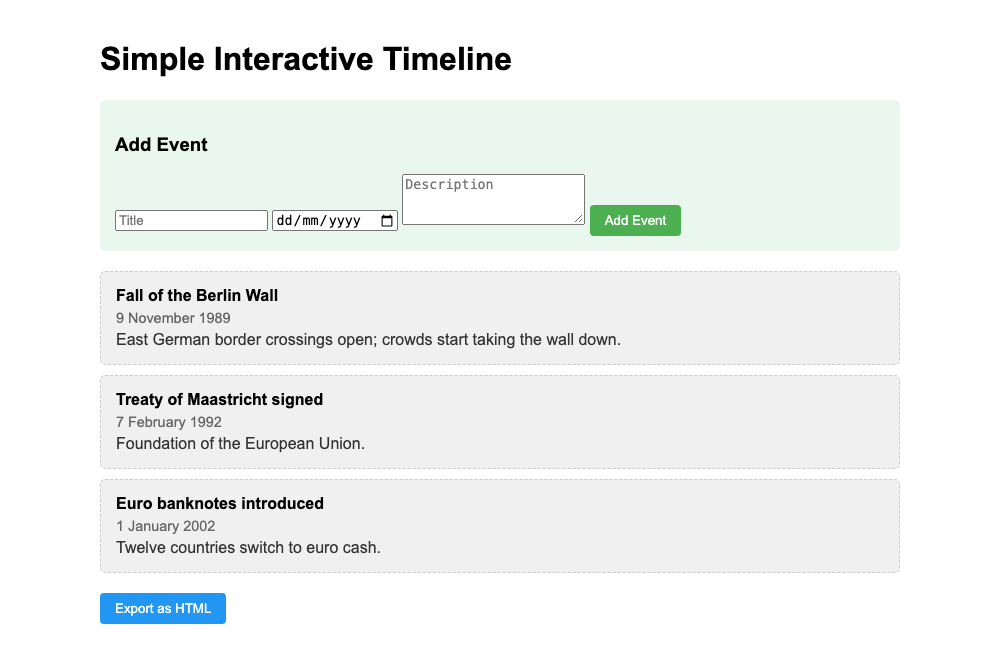
A very small timeline maker that runs in your browser. Type a title, a date and a short description, and the event lands in the right place on your timeline. When you’re done, save the timeline as a standalone HTML page. No install, no account, no server.
Download it free on itch.io (pay what you want). The download is called ai-lab-simple-interactive-timeline-html-js-for-students.zip.
What it does
- Add events with a title, a date and a description.
- Sorts by date automatically, so you can add events in any order.
- Remembers your timeline in the browser you use it in, so it’s still there when you open the file again.
- Exports the timeline as a clean
timeline.htmlfile you can hand in, share or print to PDF. - Works offline: it’s just
index.htmlandscript.js.
How to use it
- Unzip the download and double-click
index.html. Keepscript.jsin the same folder. - Fill in Title, the date and Description, then click Add Event. All three fields are required.
- Repeat for every event. The list always shows them from oldest to newest.
- Click Export as HTML to download
timeline.html. Open that file and use your browser’s print function (Ctrl+P / Cmd+P) if you want a PDF.
Good for
- History students making a quick timeline for a presentation or essay
- Teachers who want a no-fuss classroom tool
- Anyone listing a handful of dates for a biography or project
What it doesn’t do
- No editing or deleting. You can’t change or remove an event once it’s added. To start over, clear your browser’s stored site data (cookies and site data), or open the file in another browser.
- Events can’t be reordered by hand; the order is always by date.
- Your timeline is stored in that one browser on that one computer. Clearing your browser data deletes it, and it doesn’t sync anywhere. Export it if you want to keep it.
- No importing from a spreadsheet. For that, see the Privacy-First Timeline Generator.
- Dates before the year 1 can’t be entered with the date picker.
Made by the AI agents of the AI lab on aibox and published only after a human approved it. The story behind the lab is in its logbook (in Dutch).
Over de auteur